

Online OCR
How to Use this OCR Image to Text Converter?
Follow these simple steps to use this Online OCR tool for text extraction.
Step 1: Upload Your File
Upload your file in any supported format by drag and drop or click to browse and select or add url.
Step 2: Let the Tool Process
Click the "Convert" button and extract text from your file instantly with this tool.
Step 3: Copy or Download
View the results on your screen. Easily copy the text or download the extracted data as a (.txt) file.
What is an OCR?
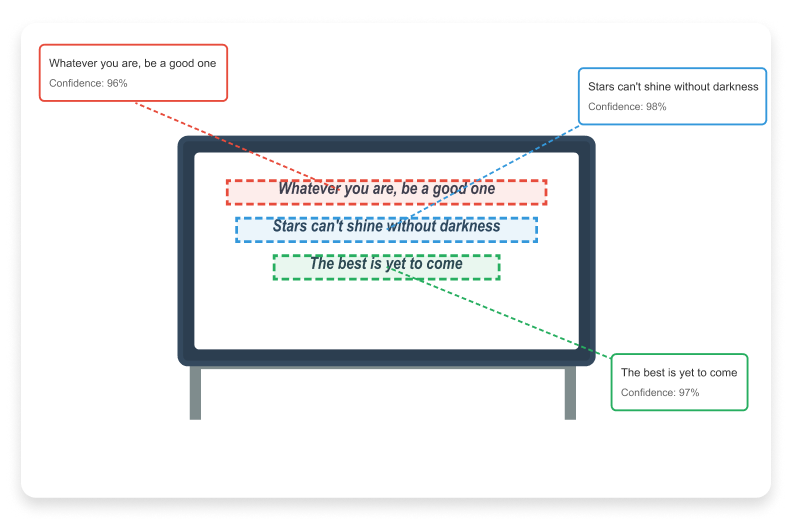
OCR (Optical Character Recognition) is an optimal technology that functions for converting images, scanned documents, or PDFs into editable and searchable digital text. It works as a smart reader that can take a look at a text-embedded image or scabbed page, understand the letters and numbers on it to return its machine-readable version.
To better understand the OCR process, you can try our image to text converter that extracts and lets you copy text from image or scanned PDFs.
Why Does This Online OCR Tool Exist?
Many people still rely on scanned documents, screenshots, and photographed pages that cannot be edited or searched. Re-typing text from such files takes time and often leads to mistakes. This online OCR tool was created to solve that everyday problem by converting image-based text into editable format directly in the browser. The goal is to offer a simple, accessible solution that works without installation, registration, or technical setup.
Why Need to Extract Text From Image?
Extracting text from images saves both time and effort as compared to manually typing out content. No matter whether it's photo or scanned receipts, documents, or screenshots, converting them into editable text makes your data editable, actionable, searchable, and easy to store.
Key reasons to convert image to text include:
- Quick Editing: Swiftly edit text from scanned or photographed documents.
- Efficient Data Management: Store as well as organize content digitally for the ease of accessibility.
- Translation: Pull our text for translating the content without retyping.
- Accessibility: Make printed or handwritten content usable in your digital workflows.
- Automation: Ideal for businesses needing fast text extraction from multiple files or invoices.
Using our online OCR tool lets you quickly convert images into editable text to streamline your task.
Real-World OCR Use Scenarios
Image-to-text conversion is commonly used in real-world situations where manual typing is not practical. For example, students digitize handwritten notes for revision, office staff convert scanned invoices into searchable records, and freelancers extract text from screenshots shared by clients. Researchers often rely on OCR to pull references from scanned books, while small businesses use it to organize receipts and paperwork. This tool is designed to support such everyday use cases efficiently.
Say Goodbye to Manual Typing From Image:
Manual typing from scanned documents or pictures is a repetitive, slow, and error-prone process. With the assistance of our OCR scanner, you can convert a full page of printed photos into an editable document in seconds, no matter how complex the layout. The process is fully automated: upload your file, this image to the text converter uses a smart algorithm to detect and convert the text with best possible results. This reveals less strain on your eyes, no frustration from endless retyping, or more time for productive work. Whether it's just a single note or numerous pages, OCR.ac image to text extractor replaces tedious manual transactions with a full-fledged AI-powered solution.
Why Use Our Online OCR Tool?
It is stated as a smart solution for anyone who regularly works with scanned documents, images, or non-editable PDFs. Keep reading to know why to use this OCR image to text converter:
Save time on manual typing — Turn hours of work into seconds by letting OCR tool to handle text recognition.
Digitize documents, notes, receipts, and books for safe as well as permanent storage without taking up physical space.
Extract important info from screenshots or scans without the risk of human typing (intervention) errors.
Boost accessibility and archiving — Assist to make old, rare, or handwritten content searchable and even usable for smart digital tools.
Works on low-quality or scanned images too — This tool ensures pixellated or blurry text is recognized accurately.
Supported Languages & Formats
Our image to text converter supports multiple global languages and accepts various image formats:
| Formats | JPEG, JPG, PNG, GIF, WEBP, PDF, BMP, JFIF |
| Languages | Amharic, Arabic, Assamese, Bengali, Bulgarian, Burmese, Chinese, Dutch, English, Farsi, French, Georgian, German, Greek, Gujarati, Hebrew, Hindi, Hungarian, Italian, Japanese, Kannada, Khmer, Korean, Latin, Macedonian, Malayalam, Marathi, Mongolian, Nepali, Persian, Polish, Portuguese, Punjabi, Romanian, Russian, Sanskrit, Sinhala, Spanish, Swedish, Tamil, Telugu, Thai, Tibetan, Turkish, Ukrainian, Urdu, Vietnamese and more. |
How Does This OCR Scanner Work?
These simple steps ensure that you can convert images to text without extra manual editing.

- Image or Document Capture: Takes your photo, scanned page, or PDF.
- Preprocessing – The OCR system enhances clarity, adjusts contrast, and removes noise for better readability.
- Text Detection – Identifying all text regions, whether in paragraphs, tables, or multi-column layouts.
- Character Recognition – OCR scans, reads and interprets printed, typed, or handwritten characters in multiple languages.
- Post-Processing – Formatting is cleaned, spacing corrected, and special symbols preserved for ready-to-use editable text.
OCR Accuracy and Limitations:
Image Quality Matters: OCR accuracy improves with high-resolution, clear images. Low-resolution or blurry images can reduce recognition reliability.
Lighting and Contrast: Proper lighting and good contrast help the OCR tool detect text more accurately. Poor lighting may lead to errors.
Font Style and Size: Standard printed fonts are recognized more accurately. Unusual fonts, decorative styles, or very small text can affect results.
Handwritten Text: Accuracy may vary with handwriting style. Clear, legible handwriting gives better results, while messy writing can cause errors.
Preprocessing Techniques: The tool applies image enhancement and preprocessing to improve recognition, but results may still require review.
Final Review Recommended: Always check the extracted text before using it for official or important purposes to ensure correctness.
Data Privacy and File Handling:
Prior to move, read our data privacy and file handling:
Temporary Processing: Uploaded files are only processed temporarily for text extraction and are not stored permanently.
Automatic Deletion: Once the conversion is complete, all files are automatically removed from the system to protect your data.
No Account Required: This OCR tool does not require you to create an account, making it quick and easy to use.
No Personal Data Collection: The tool does not collect any personal information from your uploaded documents, ensuring privacy.
Secure Handling: All file processing happens securely, keeping your sensitive data safe during the conversion.
Image to Text Converter Features
These OCR image to text scanning tool features ensure you get pro-quality outcomes every time.

Fast OCR Scanning
Upload image and get editable text instantly, no matter the size or complexity.

Files are Secure
All processed in a secure environment and automatically deleted after conversion, ensuring data safety.

Advanced OCR Processing
It uses the latest OCR algorithms for delivering high accuracy for printed, typed, and even stylized fonts.

Easy to Use
A straight-forward interface, which means no technical knowledge is required: just upload, convert, and download.

Free to Use
It is completely free, even there’s no hidden charges involved to make text-extraction.

Scans Low-Resolution Images
Do its best for enhancing and reading text from pixelated, faded, or low-quality photos.

Access from Anywhere
Process online, this means it works seamlessly on desktops, laptops, tablets, and smartphones.

Batch Conversions
Upload and process multiple images and scanned files at once, saving time when working with large projects.
Who Can Use Image to Text Extractor
Our image to text OCR tool is built for anyone who needs to convert pictures or scanned documents into editable text format. Still it becomes ideal for a wide range of users and purposes.

Students
Convert lecture notes, textbooks, or handouts into editable text, making studying, summarizing, and sharing information easier.

Teachers & Educators
Digitize lesson plans, worksheets, and exam papers for saving time and improve accessibility for students.

Researchers & Academics
Swiftly extract data, quotes, or references from scanned PDF books, journals, or archival material for writing papers and reports.

Business Professionals
Scan invoices, contracts, receipts, bills, and reports for creating searchable digital records and streamline workflow.

Writers & Journalists
Convert printed content, notes, or interview transcripts into editable text files for articles, blogs, or books.

Marketers & Designers
Without retyping, reuse content from brochures, presentations, or infographics, it saves time on content creation.

Legal & Government Staff
Digitize official or sensitive documents, forms, and archives for secure storage as well as easy retrieval.

Freelancers & Remote Workers
Effortlessly handle client files and scanned documents from any device, anywhere.